
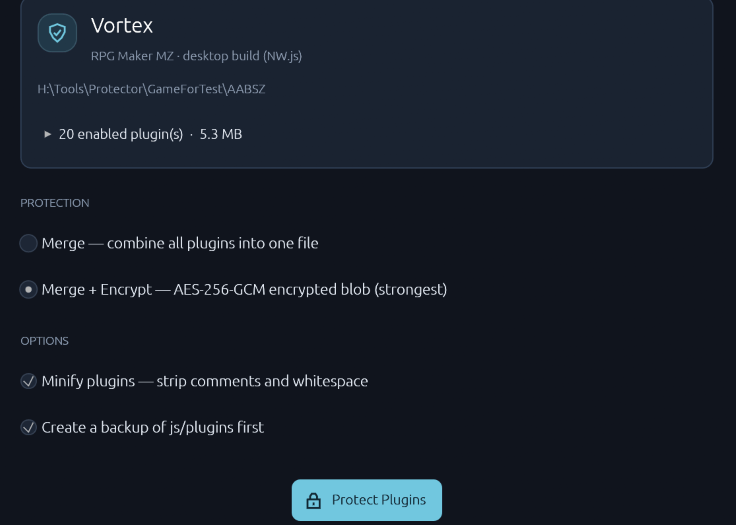
A free, open-source tool that protects the plugins of a deployed RPG Maker MV and MZ game. Merge your enabled plugins into a single file and optionally encrypt it, so your plugin code is no longer a set of readable files that can simply be copied into another project.
⬇️ Download · View source on GitHub
No installation required. A single executable of about 6 MB.
Compatibility: RPG Maker MV / MZ (deployed games)
Platforms: Windows x64 / macOS (Apple Silicon) / Linux x64
✨ Features
- Drag-and-drop workflow: drop the deployed game folder into the window or onto the
.exeicon, or pick it with Browse. - Automatic project detection: recognizes MZ and MV deployments, shows the game title, and lists the plugins that will be protected.
- Merge: combine all enabled plugins, in load order, into one file. Plugin parameters keep working because
plugins.jsis not changed. - Merge + Encrypt: encrypt the merged code with AES-256-GCM. A small loader decrypts it when the game starts.
- Minify: remove comments, help text, and formatting from readable plugins. Already-obfuscated plugins, such as VisuStella, are left exactly as they are.
An automatic backup of js/plugins, refusal to modify editor projects or already-protected games, and a confirmation dialog help protect your work.
🪄 How It Works
- Deploy your game. In RPG Maker, use File > Deployment.
- Drop the deployed folder. Use the folder with
Game.exefor MZ, or the folder containingwww/for MV. - Choose protection. Select Merge or Merge + Encrypt, set the Minify and Backup options, then click Protect Plugins and confirm.
- Test and publish. Run the game once to check that everything works, then delete the
_PKD_Protector_Backup_<time>folder before publishing.
Always protect a deployed copy, never your working project. Changes cannot be undone except by restoring the backup.
💡 Download & Installation
- Open GitHub Releases.
- Under Assets, download the archive for your system. The Source code archives are for developers building the application themselves.
- Windows x64:
PKD_Protector-<version>-windows-x64.zip - macOS (Apple Silicon):
PKD_Protector-<version>-macos-arm64.tar.gz - Linux x64:
PKD_Protector-<version>-linux-x64.tar.gz
- Windows x64:
- Extract the archive to a folder of your choice.
- Run
PKD_Protector.exe(Windows) orPKD_Protector(macOS / Linux). No installation required.
Windows is the primary platform. The macOS and Linux builds have had less real-world testing. The macOS build is not signed: if Gatekeeper blocks it, right-click the file and choose Open.
❓ Quick Answers
Which protection should I choose?
Use Merge + Encrypt for desktop games (with Game.exe). Web and mobile deployments can use Merge only, because decryption requires the NW.js desktop runtime.
Can encrypted plugins still be extracted?
The encryption key is stored inside the game, so encryption protects against casual copying, not against a determined reverse engineer.
Will my plugins still work after merging?
In most cases, yes: load order and parameters are preserved. Plugins that rely on document.currentScript may behave differently; PKD Protector warns you about them. Always test the game after protecting it.
🧭 Support & Feedback
- Questions and help: join the KD Workshop Discord.
- Bug reports and feature suggestions: use GitHub Issues. For bugs, include your RPG Maker version (MV or MZ), the protection options you used, and the error message from the game console, if any.
📄 License & Credits
Created by Pheonix KageDesu — KD Workshop.
PKD Protector is free and open source. The application source code is available under the MIT License.
Plugins you protect with this tool remain subject to their authors’ licenses and terms of use.