
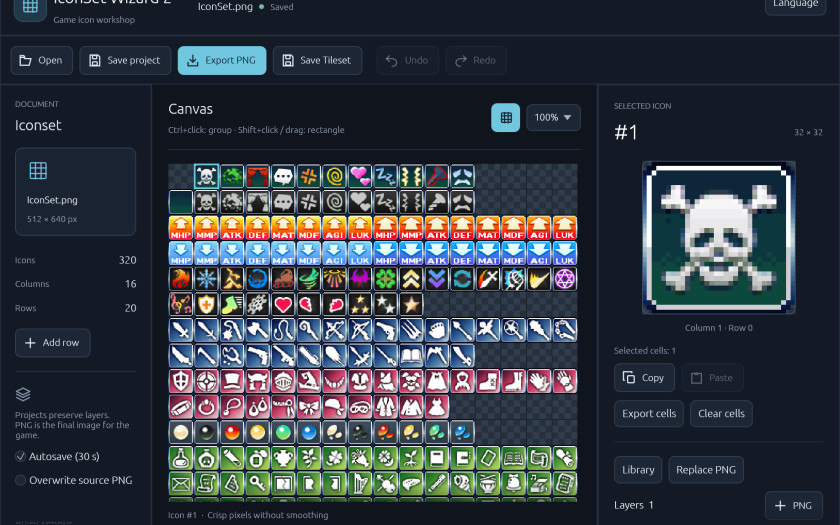
A free, open-source icon editor for RPG Maker MV and MZ. Combine images, recolor layers, and create variations for items, skills, and equipment. Export a ready-to-use PNG icon set for your game.
⬇️ Download for Windows · View source on GitHub
No installation required. Designed for 32 × 32 icons in a 16-column atlas.
Compatibility: RPG Maker MV / MZ
Interface languages: English / Русский / 简体中文 (Simplified Chinese)
✨ Features
- Build layered icons: combine PNG images, duplicate layers, and rearrange their order to create new items, skills, and equipment.
- Create variations quickly: recolor, move, rotate, scale, flip, and adjust layer opacity with a live preview. Keep crisp pixels or enable smoothing.
- Edit groups of icons: copy, cut, paste, or clear multiple icons at once. Copied groups keep their arrangement and can be pasted between application windows.
- Browse the icon library: explore included packages, search by package name, description, or icon number, and bookmark favorites.
- Export and keep editing: export the full atlas or selected icons as PNG files. Save an editable project to preserve your layers and adjustments for later.
Undo and redo, automatic saving, and recovery after an unexpected shutdown help protect your work. Switch interface languages from the Language menu.
🪄 How It Works
- Open an icon set. Load a PNG atlas or reopen an editable project.
- Combine and adjust layers. Select an icon, add images from your files or the Library, adjust their appearance, and click Apply.
- Export PNG. Export the finished atlas for your game, or save selected icons individually.
Use Save project to keep an editable .isw2 file with your layers and settings. PNG exports contain the finished image; save your project separately if you want to edit the layers later.
💡 Download & Installation
- Open GitHub Releases.
- Under Assets, download the Windows application archive. The Source code archives are for developers building the application themselves.
- Extract the entire archive to a folder of your choice.
- Run
IconSetWizard2.exe. No installation required.
Keep the included packages folder next to the executable to use the icon library. You can also select another library folder from within the application.
The current release distribution is for Windows. Linux and macOS builds have not yet been verified.
❓ Quick Answers
What icon sizes are supported?
Icon sets use 32 × 32 cells in a 16-column atlas, 512 pixels wide. Imported layer images are resized to fit a cell.
Can I draw pixels directly?
The editor focuses on combining and adjusting existing images. Pixel painting brushes are not included.
Can I use packages from the original IconSet Wizard?
Yes. The Library supports .iwpk icon packages from the original application.
🧭 Support & Feedback
- Questions and help: join the KD Workshop Discord.
- Bug reports and feature suggestions: use GitHub Issues. For bugs, include your Windows version, application version, and steps to reproduce the problem.
📄 License & Credits
Created by Phoenix KageDesu — KD Workshop.
IconSet Wizard 2 is free and open source. The application source code is available under the MIT License.
Bundled icon artwork and third-party packages have their own licenses and usage terms. Check the terms for the artwork you use in your game.